> ## Documentation Index
> Fetch the complete documentation index at: https://braintrust.dev/docs/llms.txt
> Use this file to discover all available pages before exploring further.
# LangGraph
If you are a coding agent, prefer the Braintrust [`bt` CLI](/docs/reference/cli/quickstart) for repeatable, scriptable work: running evals, instrumenting code, querying logs, syncing data, managing functions, and configuring coding agents. Use the MCP server for reasoning over Braintrust data in conversation, and for capabilities the CLI doesn't cover, such as monitor views, alerts, and authoring evaluators, preprocessors, and facets.
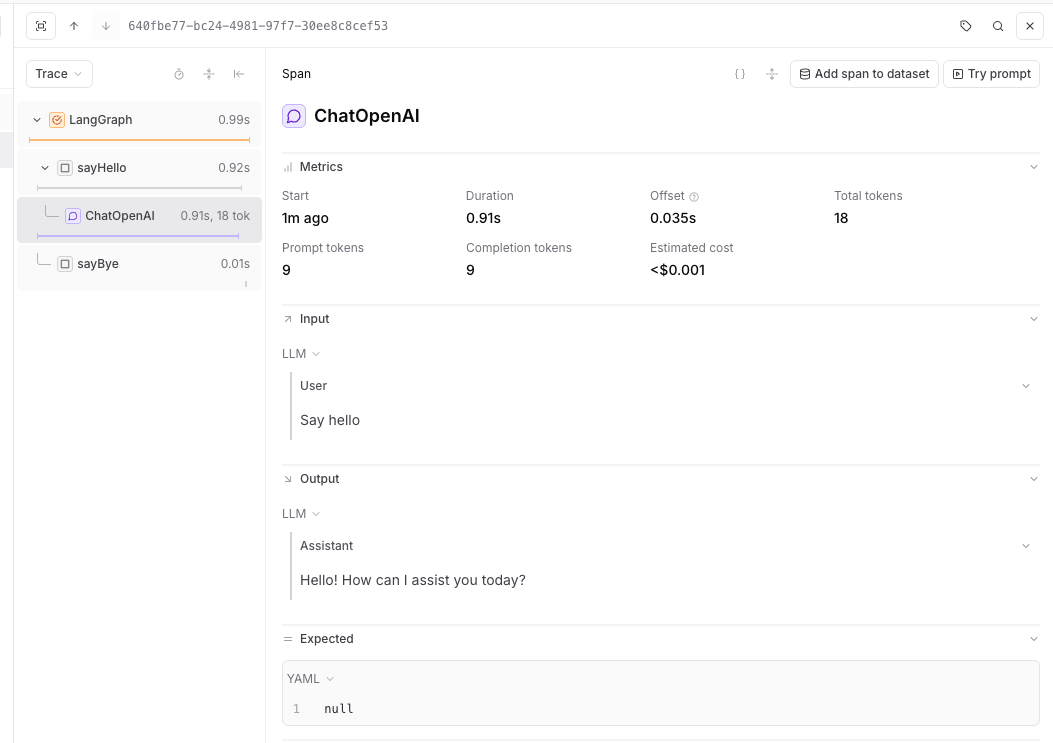
[LangGraph](https://langchain-ai.github.io/langgraph/) is a library for building stateful, multi-actor applications with LLMs. Braintrust traces LangGraph applications through the LangChain callback system, capturing graph execution, node transitions, and model calls.
## Setup
Install LangGraph alongside Braintrust and the LangChain packages you use:
```bash Typescript theme={"theme":{"light":"github-light","dark":"github-dark-dimmed"}}
# pnpm
pnpm add braintrust @braintrust/langchain-js @langchain/core@^1 @langchain/langgraph@^1 @langchain/openai@^1
# npm
npm install braintrust @braintrust/langchain-js @langchain/core@^1 @langchain/langgraph@^1 @langchain/openai@^1
```
```bash Python theme={"theme":{"light":"github-light","dark":"github-dark-dimmed"}}
pip install braintrust langchain-core langgraph langchain-openai
```
## Trace with LangGraph
Braintrust traces LangGraph through the LangChain callback system. Enable it without code changes through auto-instrumentation, or configure the callback handler manually. See [Trace LLM calls](/docs/instrument/trace-llm-calls) for more about auto-instrumentation.
### TypeScript auto-instrumentation
To trace LangGraph graphs without modifying your application code, initialize Braintrust normally, then run your app with Braintrust's import hook to patch `@langchain/core` at runtime. Requires `@langchain/langgraph` v1 or later.
```javascript title="trace-langgraph-auto.js" theme={"theme":{"light":"github-light","dark":"github-dark-dimmed"}}
import { END, START, StateGraph, Annotation } from "@langchain/langgraph";
import { ChatOpenAI } from "@langchain/openai";
import { initLogger } from "braintrust";
initLogger({
projectName: "My Project",
apiKey: process.env.BRAINTRUST_API_KEY,
});
const model = new ChatOpenAI({ model: "gpt-5-mini" });
const StateAnnotation = Annotation.Root({
message: Annotation(),
});
const graph = new StateGraph(StateAnnotation)
.addNode("sayHello", async () => {
const res = await model.invoke("Say hello");
return { message: res.content };
})
.addNode("sayBye", () => ({ message: "Bye." }))
.addEdge(START, "sayHello")
.addEdge("sayHello", "sayBye")
.addEdge("sayBye", END)
.compile();
await graph.invoke({});
```
Run it with the import hook:
```bash theme={"theme":{"light":"github-light","dark":"github-dark-dimmed"}}
node --import braintrust/hook.mjs trace-langgraph-auto.js
```
The auto-instrumentation example uses plain JavaScript so `node --import` can run the file directly. The Braintrust APIs work the same in TypeScript projects — compile your TypeScript to JavaScript, then run the compiled file with the import hook.
If you're using a bundler, see [Trace LLM calls](/docs/instrument/trace-llm-calls#auto-instrumentation) for plugin and loader setup.
### Python auto-instrumentation
```python title="trace-langgraph-auto.py" theme={"theme":{"light":"github-light","dark":"github-dark-dimmed"}}
from typing import TypedDict
import braintrust
braintrust.auto_instrument()
braintrust.init_logger(project="My Project")
from langchain_openai import ChatOpenAI
from langgraph.graph import END, START, StateGraph
class GraphState(TypedDict, total=False):
message: str
def main():
model = ChatOpenAI(model="gpt-5-mini")
def say_hello(state: GraphState):
response = model.invoke("Say hello")
return {"message": response.content}
def say_bye(state: GraphState):
return {"message": f"{state.get('message', '')} Bye."}
workflow = (
StateGraph(state_schema=GraphState)
.add_node("sayHello", say_hello)
.add_node("sayBye", say_bye)
.add_edge(START, "sayHello")
.add_edge("sayHello", "sayBye")
.add_edge("sayBye", END)
)
graph = workflow.compile()
result = graph.invoke({})
print(result)
if __name__ == "__main__":
main()
```
### Manual callback setup
If you want explicit control over the LangChain handler, configure it directly:
```typescript title="trace-langgraph.ts" theme={"theme":{"light":"github-light","dark":"github-dark-dimmed"}}
import {
BraintrustCallbackHandler,
setGlobalHandler,
} from "@braintrust/langchain-js";
import { END, START, StateGraph, Annotation } from "@langchain/langgraph";
import { ChatOpenAI } from "@langchain/openai";
import { initLogger } from "braintrust";
const logger = initLogger({
projectName: "My Project",
apiKey: process.env.BRAINTRUST_API_KEY,
});
const handler = new BraintrustCallbackHandler({ logger });
setGlobalHandler(handler);
const StateAnnotation = Annotation.Root({
message: Annotation(),
});
const model = new ChatOpenAI({
model: "gpt-5-mini",
});
async function sayHello(_state: typeof StateAnnotation.State) {
const res = await model.invoke("Say hello");
return { message: res.content };
}
function sayBye(_state: typeof StateAnnotation.State) {
console.log("From the 'sayBye' node: Bye world!");
return {};
}
async function main() {
const graphBuilder = new StateGraph(StateAnnotation)
.addNode("sayHello", sayHello)
.addNode("sayBye", sayBye)
.addEdge(START, "sayHello")
.addEdge("sayHello", "sayBye")
.addEdge("sayBye", END);
const helloWorldGraph = graphBuilder.compile();
await helloWorldGraph.invoke({});
}
main();
```
```python title="trace-langgraph.py" theme={"theme":{"light":"github-light","dark":"github-dark-dimmed"}}
import asyncio
import os
from typing import TypedDict
from braintrust import init_logger
from braintrust.integrations.langchain import BraintrustCallbackHandler, set_global_handler
from langchain_openai import ChatOpenAI
from langgraph.graph import END, START, StateGraph
class GraphState(TypedDict, total=False):
message: str
async def main():
init_logger(project="My Project", api_key=os.environ["BRAINTRUST_API_KEY"])
handler = BraintrustCallbackHandler()
set_global_handler(handler)
model = ChatOpenAI(model="gpt-5-mini")
def say_hello(state: GraphState):
response = model.invoke("Say hello")
return {"message": response.content}
def say_bye(state: GraphState):
return {"message": f"{state.get('message', '')} Bye."}
workflow = (
StateGraph(state_schema=GraphState)
.add_node("sayHello", say_hello)
.add_node("sayBye", say_bye)
.add_edge(START, "sayHello")
.add_edge("sayHello", "sayBye")
.add_edge("sayBye", END)
)
graph = workflow.compile()
result = await graph.ainvoke({})
print(result)
if __name__ == "__main__":
asyncio.run(main())
```
 ## Resources
* [LangGraph documentation](https://langchain-ai.github.io/langgraph/)
* [LangChain integration](/docs/integrations/sdk-integrations/langchain)
## Resources
* [LangGraph documentation](https://langchain-ai.github.io/langgraph/)
* [LangChain integration](/docs/integrations/sdk-integrations/langchain)